Alternatives
An Adobe Audition alternative that is free, open source and runs on Linux
edytlab is a free, MIT-licensed desktop editor for macOS, Windows and Linux in which an AI agent runs local audio tools from a sentence you type; a hosted AI provider bills you for tokens unless you use Ollama. Adobe Audition is a paid multitrack audio editor with third-party plugin support, which edytlab does not have. They suit different jobs.
Quick facts
Each row links the page that states Adobe Audition's side and the day we read it. edytlab's side links to its own docs. How the pages are made is on the about page, and the comparison hub sets edytlab beside other AI audio editors.
| Fact | edytlab | Adobe Audition |
|---|---|---|
| Price | The app is free. A hosted AI provider bills you for tokens; Ollama is free and runs on your machine. | US$22.99/mo, annual plan billed monthly, for Audition alone; Creative Cloud Pro US$69.99/mo, or US$34.99/mo for the first 3 months for new subscribers; a free trial is offered and its length is not stated on the page. adobe.com/products/audition.html · checked |
| License | MIT. | The pages read describe a commercial subscription product and give no open-source license. adobe.com/products/audition.html · checked |
| Platforms | macOS (universal), Windows and Linux. The installers are unsigned. | Windows 11 (version 24H2, including Windows on Arm) and macOS Sonoma (14) or later, per Adobe’s system requirements for Audition 26.5 (September 2026). The page lists no Linux requirements. |
| Where the audio is processed | On your computer. Only the chat goes to the AI provider you pick, and with Ollama it stays on your machine too. The app sends no telemetry. | A desktop application. Adobe’s requirements page says an internet connection and registration are necessary for software activation, validation of subscriptions and access to online services. |
| AI features | An agent that calls edytlab's editing tools from your request. Transcription runs on your computer from v0.8.0, after a one-time model download. Stem separation has not shipped. | The product page names Remix: “Easily and automatically rearrange any song to fit any duration with Remix in Audition.” The page does not describe chat or agent control. adobe.com/products/audition.html · checked |
| Third-party plugins | None: edytlab has no plugin hosting. | Its help site documents adding third-party plugins and an Essential Sound panel for editing, repairing and improving audio. |
Where Adobe Audition is better
These are the places where, by Adobe's own pages, Audition does something that edytlab does not do, or does not do in the same way.
- Third-party plugins. Adobe's help site documents adding third-party plugins to Audition. edytlab hosts none: its README says it has no plugin hosting, so the effects you can use are the ones built into it.
- A full workstation toolset. Adobe describes Audition as a toolset that includes multitrack, waveform and spectral display for creating, mixing, editing and restoring audio. edytlab also has multitrack sessions and can draw a spectrogram in place of the waveform, but its spectrogram is a view to look at: its tools take time ranges (and, since v0.8.0, words), and none of them edits a selection of frequencies on the spectrogram.
- A panel for repairing and improving audio. Adobe's help site documents an Essential Sound panel for editing, repairing and improving audio. edytlab has no such panel: you ask the agent, which calls tools such as
eq,compressor,de_esserandnoise_reduction. - Remix. Adobe's product page names Remix: “Easily and automatically rearrange any song to fit any duration with Remix in Audition.” edytlab has no tool that rearranges a song to a target length by itself. You can still ask the agent to copy, cut, repeat and join sections, one instruction at a time, as the recording below shows.
Jobs both can do
Not everything on edytlab's side is new to Audition. Adobe's help site lists the topics “Remove silences from your audio recordings” and “Matching loudness across multiple audio files”. edytlab does both as well: silence_finder and truncate_silence find and remove silent stretches, normalize_loudnesssets a track's gain to a loudness target such as −14 LUFS, and batch_apply runs a saved recipe on every audio file in a folder. Neither product is the only one to offer these; what differs is how you ask for them.
Where edytlab differs
edytlab's approach is to describe a job and let an agent run the tools. These are the differences, each one about edytlab and checkable in its docs.
- The app is free, and open source. It is released under the MIT license and its source is public. That is not the whole cost: a hosted AI provider bills you for tokens, at the rates on that provider's own price list, unless you use Ollama.
- It builds for Linux. edytlab has installers for macOS, Windows and Linux. Adobe's requirements page for Audition 26.5 lists Windows 11 and macOS Sonoma or later and no Linux.
- Describe a multi-step job in words. Ask for something like “extend the intro by eight bars, hold back the low end until the drop and export a WAV”, and the agent calls the tools in order. You hear the result at each step and can undo it.
- A branching history, not one undo stack. Every state is a node in a graph. You can fork it, name it, compare two versions and revert, and undo follows the path you took.
- Recipes you can replay over a folder.
export_recipewrites a session's steps to a JSON file with no audio in it, andbatch_applyruns that file on every audio file in a folder, each file becoming its own project. - Speech to text on your computer. From v0.8.0 the agent can transcribe a track with the Whisper base speech model and cut words or filler words from the transcript. The model (about 139 MB) is not installed with the app: you download it once from Settings, and nothing downloads it for you. The audio never leaves your computer, but the words the model finds reach your AI provider as text, unless you use Ollama.
- Local processing. Decoding, editing and rendering run in-process in Rust. The AI provider sees your chat and the tools' results, never your audio. The local-first page lists what stays and what leaves, and what to expect from local models.
The recording below (1:55) shows one such job, from a request for a track's tempo to the exported WAV: the first eight bars are copied to make a sixteen-bar intro. It is a sequence of ordinary edits that the agent was asked for, and not an automatic remix. Waits for the assistant are sped up; every playback is in real time.
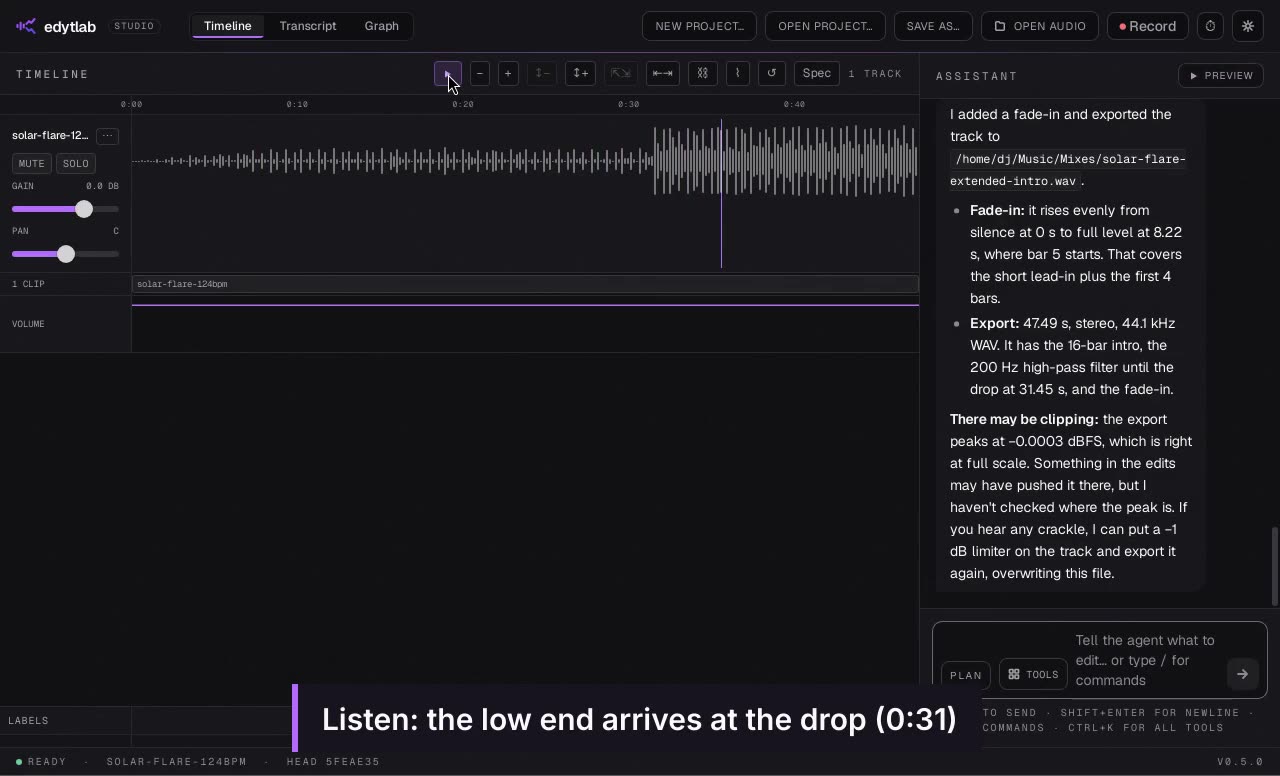 Length 1:55
Extend an intro for mixing
Turn an eight-bar intro into a sixteen-bar one and open a filter into the drop.
Recorded in the real app with Claude, on short synthetic demo tracks. Waits sped up.
What each costs
Adobe's product page shows US$22.99 a month on an annual plan billed monthly for Audition alone. Creative Cloud Pro is US$69.99 a month, or US$34.99 a month for the first 3 months for new subscribers, and a free trial is offered; the page does not say how long it lasts. Those are the figures on the day we read it, in the currency shown, and they may differ for you or change.
edytlab's app costs nothing. If you chat with a hosted provider you pay that provider for tokens, at its own rates. With Ollama running on your machine nothing is billed, though local models have limits of their own, which the local-first page lists. We make no estimate of what a month of editing would cost with either product, because it depends on how much you edit and which model you use.
Activation and privacy
Adobe's requirements page says an internet connection and registration are necessary for software activation, validation of subscriptions and access to online services. This page says nothing about Adobe's handling of data beyond that.
edytlab keeps your audio on your computer. The chat, with the results of the tools the agent calls, goes to the AI provider you pick, or stays on your machine with Ollama. The app has no update check and sends no telemetry. This website does record visits with anonymous Vercel analytics; the privacy page says what.
An Adobe Audition alternative for Linux, macOS and Windows
If you are looking for an Adobe Audition alternative for Linux, edytlab is one; it needs an AI provider, or Ollama, for the chat. It is also an Adobe Audition alternative on macOS and an Adobe Audition alternative for Windows, if you would rather describe an edit than build it by hand. Looking for a free Adobe Audition alternative that is also open source? edytlab is an open-source Adobe Audition alternative under the MIT license, and free to download and use; the cost of a hosted provider is described above. edytlab's installers are unsigned, so macOS and Windows warn on first launch (the getting started guide has the steps).
If a plain, free editor is what you need, the Audacity alternative page sets edytlab beside Audacity, which is also free and open source and runs on Linux. It suits different jobs from edytlab, and both are worth reading before you choose.
Use both
Nothing stops you using both. edytlab loads WAV, MP3, FLAC and other common audio formats and exports WAV, FLAC or MP3, so audio moves between the two as ordinary files. It has no importer for Audition's own project files, so export the audio from Audition first and load that.
Verdict
Choose Adobe Audition if
- you rely on third-party plugins, or on the Essential Sound panel, in your work;
- you work in multitrack and spectral displays and want them as part of one toolset;
- you want Remix to rearrange a song to a given length for you;
- you already pay for Creative Cloud and want Audition in it.
Choose edytlab if
- you would rather describe a multi-step job in a sentence than build it by hand;
- you want it free and open source, or you use Linux;
- you want a branching history, recipes you can replay over a folder, or loudness targets by name;
- you can work without plugins, and without stem separation, which has not shipped.
You can also use both: export audio from one and load it in the other. The comparison hub sets edytlab beside other AI audio editors, with each cell linked to the page that states it.
Common questions
Is edytlab a drop-in replacement for Adobe Audition?
No. Audition documents third-party plugins and an Essential Sound panel that edytlab has no counterpart to, and edytlab has not shipped stem separation. edytlab suits jobs you can say in a sentence.
Is there an Adobe Audition alternative for Linux?
edytlab runs on Linux, and so does Audacity. Adobe's requirements page for Audition lists Windows and macOS and no Linux, as of the day we read it.
Can I open my Audition projects in edytlab?
Not directly. edytlab loads audio files and has no importer for Audition's project files, so export the audio from Audition and load that.
Does edytlab need an internet connection?
The editing does not: it runs on your computer. The chat does, unless you use Ollama on your own machine. Downloading the speech model for transcription is a separate step that you start yourself.
Why does my computer warn me when I open edytlab?
The installers are not signed, so macOS and Windows warn on first launch. The source is public, and the getting started guide has the steps.
Sources
Everything stated about Adobe Audition comes from these pages, read on the dates shown.
- Adobe Audition product page (adobe.com/products/audition.html), checked
- Adobe Audition help: system requirements (helpx.adobe.com/audition/desktop/introduction/system-requirements.html), checked
- Adobe Audition help: topic list (helpx.adobe.com/audition/desktop.html), checked