Alternatives
An Audacity alternative you control by describing the edit
edytlab is a free, MIT-licensed desktop editor in which an AI agent runs local audio tools from a sentence you type; a hosted AI provider bills you for tokens unless you use Ollama. Audacity is also free and open source, and is the better fit if you record, use audio plugins or edit waveforms by hand. They suit different jobs.
Quick facts
Each row links the page that states Audacity's side and the day we read it. edytlab's side links to its own docs. How the pages are made is on the about page.
| Fact | edytlab | Audacity |
|---|---|---|
| Price | The app is free. A hosted AI provider bills you for tokens; Ollama is free and runs on your machine. | Free: “Audacity has always been and will always remain free for everyone.” audacityteam.org · checked |
| License | MIT. | Yes, GPL v3: its Audacity 4 page lists the license as “Free, GPL v3”. audacityteam.org/audacity-4 · checked |
| Platforms | macOS (universal), Windows and Linux. The installers are unsigned. | Windows (x86_64 and ARM64 installers), macOS (universal: Apple Silicon and Intel) and Linux (x86_64 and ARM64 AppImages). Current version 4.0.1. audacityteam.org/download · checked |
| Where the audio is processed | On your computer. Only the chat goes to the AI provider you pick, and with Ollama it stays on your machine too. The app sends no telemetry. | A desktop app: its privacy notice covers “our desktop app, Audacity”. The notice lists three network features, each of which it says can be disabled in preferences: update checking (on by default), error reporting and a random identifier that is stored only if you opt in. Audio is not among the data it lists. audacityteam.org/legal/privacy-notice · checked |
| AI features | An agent that calls edytlab's editing tools from your request. Stem separation and transcription have not shipped. | Optional Intel OpenVINO plugins for music separation (stems), noise suppression, music generation and continuation, and Whisper transcription. Its plugin page says these features “run 100% locally on your PC” with “no internet connection necessary”. A separate NVIDIA Broadcast denoiser works only on Windows with an NVIDIA RTX GPU. |
| Audio plugins | None: edytlab has no plugin hosting. | Its home page lists plugin support: “a vast selection of third-party plugins, including VST3, Nyquist and more”. audacityteam.org · checked |
Where Audacity is better
These are the places where, by Audacity's own pages, it does more than edytlab does.
- Audio plugins. Audacity's home page lists “a vast selection of third-party plugins, including VST3, Nyquist and more”, and its Audacity 4 page says LV2 plugins load “right alongside VST3 and Audio Units”. edytlab hosts none of these: its README says it has no plugin hosting.
- Local AI plugins today. Audacity's plugin page lists Intel OpenVINO plugins named “Music Separation” (it splits a track into drums, bass, vocals and other instruments), “Noise Suppression”, “Music Generation and continuation” and “Whisper Transcription”, and says these features “run 100% locally on your PC” with no internet connection necessary. edytlab has not shipped stem separation or transcription. A June 2025 post says the plugins reached macOS with Audacity 3.7.4, as a beta of sorts. We could not find a statement on Audacity's site that they work with Audacity 4, the current version, so check before you rely on them there.
- AI in Audacity's plugin store. Audacity's home page also promotes MuseHub plugins, one described as “Clean up spoken voice and create instant transcripts” and another as “Automatically split mixed-speaker audio into separate tracks”. Audacity has AI tools of its own.
- Recording and hand editing. Audacity's FAQ lists recording live with a microphone or mixer and a spectrogram view among its features, and its blog marked the project's 25th anniversary in May 2025. If your work is recording and cutting by hand, it is the long-established tool for it. edytlab is a new project.
- No AI provider needed. Audacity does its work without an AI provider, a key or a model. edytlab's chat needs one: a hosted provider with your own key, or Ollama running on your machine.
Where edytlab differs
edytlab's approach is to describe a job and let an agent run the tools. These are the differences, each one about edytlab and checkable in its docs.
- Describe a multi-step job in words. Ask for something like “match this track to 124 BPM, crossfade it into the next, bring both to −14 LUFS and export a WAV”, and the agent calls the tools in order. You can hear the result at each step and undo it.
- A branching history, not one undo stack. Every state is a node in a graph. You can fork it, name it, compare two versions and revert, and undo follows the path you took.
- Loudness targets by name.
normalize_loudnesstakes a preset: Spotify and YouTube −14 LUFS, Apple Podcasts −16, broadcast −23. It sets a track's gain to reach the target, capped at a peak ceiling (−1 dBFS by default). - Recipes you can replay over a folder.
export_recipewrites a session's steps to a JSON file with no audio in it, andbatch_applyruns that file on every audio file in a folder, each file becoming its own project. - Tempo and beat tools in the same place.
analyze_trackreturns BPM, key, beat grid and EBU R128 loudness.time_stretchchanges length without changing pitch, andalign_to_beatwarps a track so its beat positions land on a grid. Both run on a phase vocoder written for edytlab. - Local processing. Decoding, editing and rendering run in-process in Rust. The AI provider sees your chat and the tools' results, never your audio. The local-first page lists what stays and what leaves, and what to expect from local models.
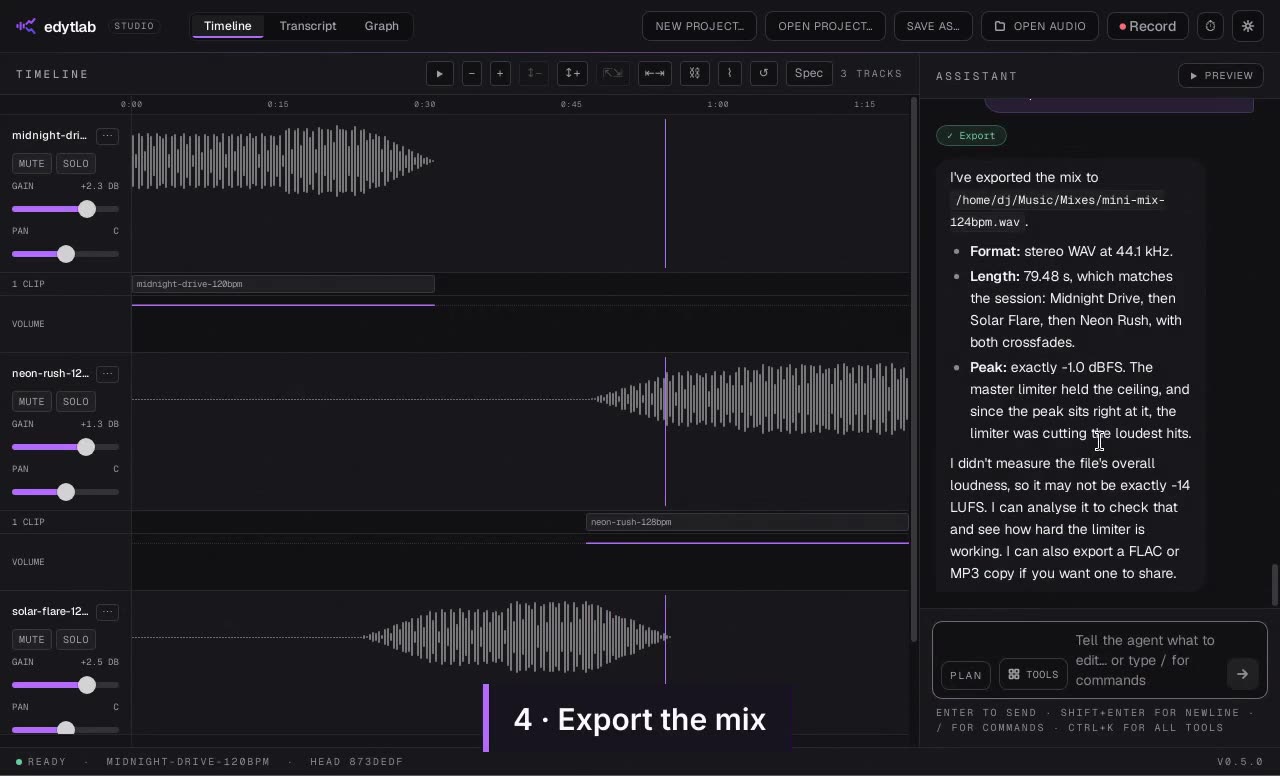
The three-track mini-mix recording (1:58) shows one such job from request to exported WAV. Waits for the assistant are sped up; every playback is in real time.
Use both: exports and labels
Nothing stops you using both. edytlab loads WAV, MP3, FLAC and other common audio formats and exports WAV, FLAC or MP3, so audio moves between the two as ordinary files. It has no importer for Audacity's own project files, so export the audio from Audacity first and load that.
Labels are the one place the two share a format. Audacity's manual says label tracks export to and import from tab-delimited plain text: start time in seconds, end time, then the label's text. edytlab's import_labels and export_labels read and write that layout. export_labels returns the text in the chat and writes no file, so save it as a .txt file to bring it into Audacity (File, Import, Labels), and paste Audacity's exported text to the agent to bring labels the other way.
Chat control inside Audacity
If you like Audacity and want an assistant inside it, third-party projects connect MCP-capable AI assistants to it. One of them, AudacityMCP, says in its README that it works with Audacity 3.x and cannot control Audacity 4, and it points to a separate early-alpha project for Audacity 4 that needs a companion fork built from source. We have not tried either project.
Privacy
Audacity's privacy notice for Audacity 4 and newer, last updated 31 August 2026, says all of its network features are optional and lists three: update checking, which is on by default; error reporting; and a randomly generated identifier that is stored only if you opt in. It says each can be disabled in preferences, and audio is not among the data it lists. This page says nothing about Audacity's privacy beyond that notice.
edytlab keeps your audio on your computer. The chat, with the results of the tools the agent calls, goes to the AI provider you pick, or stays on your machine with Ollama. The app has no update check and sends no telemetry. This website does record visits with anonymous Vercel analytics; the privacy page says what.
An Audacity alternative for Linux, macOS and Windows, and what each costs
Both run on all three. If you would rather describe an edit than do each step by hand, edytlab is an Audacity alternative for Linux, an Audacity alternative on macOS and an Audacity alternative for Windows. Looking for a free Audacity alternative that is also open source? edytlab is an open-source Audacity alternative under the MIT license; Audacity itself is GPL v3, per its Audacity 4 page. edytlab's installers are unsigned, so macOS and Windows warn on first launch (the getting started guide has the steps).
Audacity is free: its home page says it “has always been and will always remain free for everyone”. Its FAQ notes that extra Audacity Cloud storage is something people pay for, and its Audacity 4 page says MuseHub lists free and paid plugins. edytlab's app is free too, but a hosted provider bills you for tokens, at the rates on that provider's own price list. Ollama is free and runs on your machine, so nothing is billed if you use it; local models have limits of their own, which the local-first page lists.
Verdict
Choose Audacity if
- you record audio, or edit waveforms by hand and want that to be the main way you work;
- you rely on VST3, LV2, Audio Unit or Nyquist plugins;
- you want Audacity's local AI plugins today, and have checked that they support the version you run;
- you want no AI provider, key or model involved at all.
Choose edytlab if
- you would rather describe a multi-step job in a sentence than do each step by hand;
- you want a branching history, recipes you can replay over a folder, or loudness targets by name;
- you are happy to bring an AI provider's key, or run Ollama on your machine;
- you can work without audio plugins, and without stem separation or transcription, which have not shipped.
You can also use both: export audio from one and load it in the other, and share labels as described above.
Common questions
Is edytlab a drop-in replacement for Audacity?
No. Audacity hosts audio plugins and has optional local AI plugins that edytlab does not match, since stem separation and transcription have not shipped here. edytlab suits jobs you can say in a sentence.
Can I open my Audacity projects in edytlab?
Not directly. edytlab loads audio files and has no importer for Audacity's project files, so export the audio from Audacity and load that.
Does edytlab need an internet connection?
The editing does not: it runs on your computer. The chat does, unless you use Ollama on your own machine.
Why does my computer warn me when I open edytlab?
The installers are not signed, so macOS and Windows warn on first launch. The source is public, and the getting started guide has the steps.
Sources
Everything stated about Audacity comes from these pages, read on the dates shown.
- Audacity home page (audacityteam.org), checked
- Audacity 4 page (audacityteam.org/audacity-4), checked
- Audacity download page (audacityteam.org/download), checked
- Audacity privacy notice (Audacity 4 and newer) (audacityteam.org/legal/privacy-notice), checked
- Audacity AI plugins page (plugins.audacityteam.org/ai-plugins/ai-plugins), checked
- Audacity blog: OpenVINO AI plugins for macOS (audacityteam.org/blog/openvino-mac), checked
- Audacity FAQ (audacityteam.org/faq), checked
- Audacity blog: Audacity turns 25 years old (audacityteam.org/blog/25-years), checked
- Audacity manual: Importing and Exporting Labels (manual.audacityteam.org/man/importing_and_exporting_labels.html), checked
- AudacityMCP README (a third-party project) (github.com/xDarkzx/Audacity-MCP), checked